Why Dust Collection Matters
Wood dust is more than just a nuisance—it’s a serious health and safety hazard in any woodshop. Proper dust collection protects your respiratory system, improves air quality, reduces fire risks, and keeps equipment functioning optimally. At Reforge Charleston, using the dust collection system is mandatory when operating any power tool in the woodshop.
Health Risks of Wood Dust Exposure
Fine wood dust particles can penetrate deep into your lungs, causing chronic respiratory issues, allergies, and occupational asthma. Certain wood species contain toxic compounds that increase the risk of cancer and other serious health conditions. Long-term exposure without proper protection can result in permanent lung damage. Using an active dust collection system dramatically reduces these risks by capturing dust at the source before it becomes airborne.
Understanding Your Dust Collection Setup
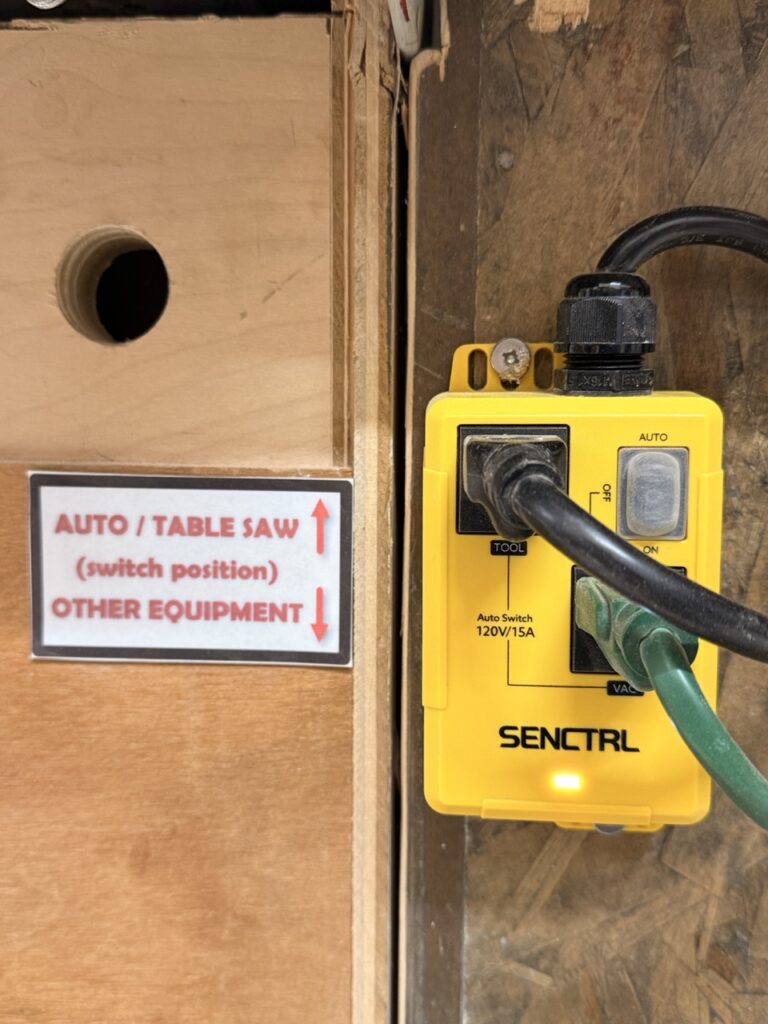
The Reforge Charleston woodshop features a centralized dust collection system with a dedicated power control box mounted on the left side of the table saw. This intelligent system automatically activates when you switch tools, making it easy and convenient to stay safe.
The SENCTRL Auto-Switch Power Box
The yellow SENCTRL auto-switch box (120V/15A) controls power distribution to the dust collector and woodshop equipment. This device features two operational modes that you must switch between depending on which tool you’re using.
Operating the Dust Collection System
When Using the Table Saw
Position the switch ALL THE WAY UP to the AUTO position.
- The AUTO setting automatically activates the dust collector when the table saw is powered on
- When you turn off the table saw, the dust collector continues running briefly to clear any remaining dust
- This setting is optimized specifically for table saw operation and debris patterns
- Never attempt to use the table saw without the switch in the AUTO position
When Using Other Woodshop Equipment
Position the switch ALL THE WAY DOWN to the ON position.
- The ON setting keeps the dust collector running continuously while you’re actively working
- Use this position for band saws, orbital sanders, jigsaws, routers, and other non-table-saw equipment
- Monitor dust accumulation and empty the collection bag as needed
- You must manually turn off the dust collector when finished with your project
When Finished Working
Return the switch to AUTO position before leaving the woodshop.
- Even if you were using other equipment, always reset to AUTO
- This ensures the system is ready for the next user and protects the table saw
- Leaving the switch in the ON position can cause equipment issues and confusion for others
- It’s part of proper woodshop etiquette and safety protocol
Step-by-Step Operating Procedure
Before Starting Any Project:
- Check that the dust collection bag is not full (empty if needed)
- Inspect the hose connections for cracks or disconnections
- Verify that the dust collector unit is undamaged and operational
- Crank the dust filter wiper crank handle a few times before and after each use
- Set the SENCTRL switch to the appropriate position for your tool
- Do not start your power tool until you confirm the dust collector is activated
During Work:
- Listen for the dust collector motor running—you should hear a distinct sound
- If you don’t hear the collector, stop immediately and check the switch position
- Watch for adequate suction at the tool’s dust port
- Never work without active dust collection—it only takes a few minutes of exposure to cause respiratory irritation
After Completing Your Project:
- Turn off your power tool
- If you used non-table-saw equipment, manually turn off the dust collector (switch the SENCTRL to AUTO)
- Clean up any spilled dust using the shop vacuum—never sweep dry sawdust (it becomes airborne)
- Return the SENCTRL switch to AUTO position
- Log your visit if required by Reforge Charleston protocol
Common Issues and Troubleshooting
Dust Collector Not Activating
- Check the switch position: Verify it’s in the correct position (AUTO for table saw, ON for other tools)
- Check the collection bag: A full bag blocks airflow and may trigger automatic shutoff
- Inspect hose connections: Look for disconnected or cracked hoses
- Listen for power: Is the outlet providing power? Test with another device
- Contact staff: If none of these resolve the issue, notify a Reforge Charleston instructor immediately
Poor Suction at the Tool
- Dust built up inside the filter. Turn the Crank on the filter after every use!
- Collection bag is too full: Empty the bag immediately—this is the most common cause
- Hose blockage: Inspect the entire hose length for clogs or compressed areas
- Loose connections: Tighten any loose hose clamps or fittings
- Wrong switch position: Confirm you’re using the correct setting
- Equipment damage: Look for splits or damage in collection bags or tubing
Switch Not Responding
- Power check: Ensure the outlet has power by testing with another device
- Switch position: Move the switch fully to each position (may be stuck between settings)
- Circuit breaker: Check if the shop’s main circuit breaker has tripped
- Equipment failure: Do not attempt to repair the SENCTRL unit yourself—notify staff immediately
Personal Protective Equipment (PPE)
While the dust collection system significantly reduces airborne dust, it’s not foolproof. Always wear appropriate PPE when working in the woodshop:
- Dust mask or respirator: At minimum, wear an N95 dust mask; use a P100 respirator for sensitive individuals or when working with exotic woods
- Safety glasses: Protect your eyes from flying debris
- Hearing protection: Woodshop tools produce loud noise that can damage hearing over time
- Work gloves: Protect hands from splinters and sharp edges
- Closed-toe shoes: Protect feet from dropped tools and debris
Maintenance and Bag Emptying
Proper maintenance keeps the dust collection system working effectively and safely:
- Check collection bag before each session: A full or nearly full bag reduces suction and should be emptied
- Empty the bag properly: Take the bag outside or to a designated disposal area; never empty it indoors
- Inspect hoses monthly: Look for cracks, splits, or compression areas that reduce airflow
- Replace damaged components: Report any damaged bags, hoses, or connections to Reforge staff
- Clean the collection area: Periodically wipe down the external dust collection unit
Safety Certification Requirement
Before using any woodshop power tools at Reforge Charleston, you must complete the Woodshop Safety Certification course. This course covers proper dust collection procedures, equipment operation, personal protective equipment, and emergency protocols. Your certification demonstrates that you understand and commit to following all safety procedures, including mandatory dust collection system use.
Key Takeaways
- Always activate dust collection before starting any power tool
- Table saw: Switch to AUTO (all the way up)
- Other equipment: Switch to ON (all the way down)
- When finished: Return switch to AUTO
- Listen and verify the dust collector is running
- Empty collection bags regularly to maintain suction
- Wear appropriate PPE in addition to using dust collection
- Report any system malfunctions to staff immediately
- Never operate power tools without active dust collection
Instructional Videos
For visual demonstrations of dust collection systems and proper woodshop safety practices, check out these helpful resources:
- Understanding Dust Collection Basics: Woodworking Fundamentals: Dust Collection 101 – Covers the importance of dust collection and how systems work
- Table Saw Safety and Dust Collection: SawStop Table Saw Safety Series – Demonstrates proper safety procedures at the table saw
- Dust Collection Maintenance: Dust Collection System Maintenance and Troubleshooting – Best practices for keeping your system in top condition
- Health Risks of Wood Dust: OSHA Wood Dust Safety Awareness – Learn about the serious health impacts of wood dust exposure
- Power Tool Safety Overview: Complete Woodshop Safety Guide – Comprehensive overview of woodshop best practices
Reference Links and Resources
- OSHA: Wood Dust Safety Standards – Official occupational safety guidance
- CDC/NIOSH: Hazard Control Guidelines for Wood Dust – Comprehensive health and safety information
- Wood Magazine: Complete Dust Collection Guide – Expert recommendations for dust collection systems
- SENCTRL Auto-Switch Product Information – Official documentation for your dust collection controller
- Popular Woodworking: Dust Collection Solutions – Troubleshooting and optimization tips
Questions? Contact a Reforge Charleston instructor if you need clarification on dust collection procedures or if you notice any system malfunctions. Your safety is our top priority.